
Standard Operating Procedure
CES — Lot Attendant | Receiving Returns Lot Attending
CES — Lot Attendant | Receiving Returns · All Nellis Auction Facilities
| Document ID | SOP_CES_ReturnsLotAttendant_05.03.2026_V1 |
| Version | 1.0 |
| Effective Date | 05/03/2026 |
| Process Owner | Customer Service Area Manager |
| Facility | All Nellis Auction Facilities |
Purpose
The purpose of this Standard Operating Procedure (SOP) is to establish clear, standardized procedures for the Lot Attendant role in managing the Returns parking lot. This document outlines the required steps for safely, accurately, and efficiently serving customers to achieve desired business outcomes. Adherence to these procedures ensures accurate item handling, proper system use, and efficient customer flow, which collectively minimize inventory discrepancies, reduce customer wait times, and maintain overall operational efficiency.
Scope & Audience
Scope
This Standard Operating Procedure (SOP) covers all functions of the lot attending role across all Nellis facilities. Specifically, this document applies to all operations conducted in the Returns parking lot, including vehicle check-in, item verification, parking space management, and customer service.
Audience
The following roles must read, understand, and follow this SOP:
- Returns and Warehouse Team Members
- Area Managers
- Certified Trainers
- Operations Leadership
Roles & Responsibilities
Define who does what. Every role involved in this process appears below.
| Role | Responsibility | Description |
|---|---|---|
| Team Member | Returns Receiving & Customer Check-in | Accurately process returns, assign parking spaces, verify items, and follow all system procedures. Use the Cargo system to manually check in customers for appointments and assist self-check-in customers with authorized pickups and general questions. |
| Area Manager | Oversight & Service Management | Ensure compliance, provide support, enforce standards, and handle escalations. Manage the quick and efficient customer check-in experience to aid in parking lot turnover. |
| Certified Trainer | Training & Competency | Utilize tools to train new team members in the parking lot area, effectively communicating processes, standards, and quality expectations. Train team members on SOP procedures and ensure ongoing competency. |
Definitions & Key Terms
Specialized terms, acronyms, and internal jargon used in this SOP are defined below.
| Term | Definition |
|---|---|
| Appointment Queue Status Dashboard | The status dashboard within Cargo used to identify where customers and their items are located throughout the pickup or return experience. |
| Check-In | The process of adding customers to the Load Out queue for their appointment. |
| Parking Spaces | Numbered parking spaces designated for customers, categorized into colored zones, aiding the Load Out team in locating assigned customers. |
| Self-Check In | The process that enables customers to check themselves in for their appointment using their mobile devices, allowing them to bypass lot attendants for smooth, hassle-free pickups along the happy path. |
| Over-Receiving | Over-receiving occurs when more items are accepted in the system than are physically present and verified at the time of the return. Example: If a customer physically provides 2 items, but 3 items are accepted or completed in the system, this is considered over-receiving. |
| Returns Code | System code used exclusively for processing returned items. |
| Green Appointment | System interface used for scheduled return appointments. |
Required Supplies & PPE
All equipment, tools, and PPE required to perform this process are listed below.
| Equipment / Supply | Supplier / Item Number | Photo / Reference |
|---|---|---|
| iPad or Phone | Apple |  |
| Safety Vest | Eagle Promotions — Sandy@nellisauction.com | 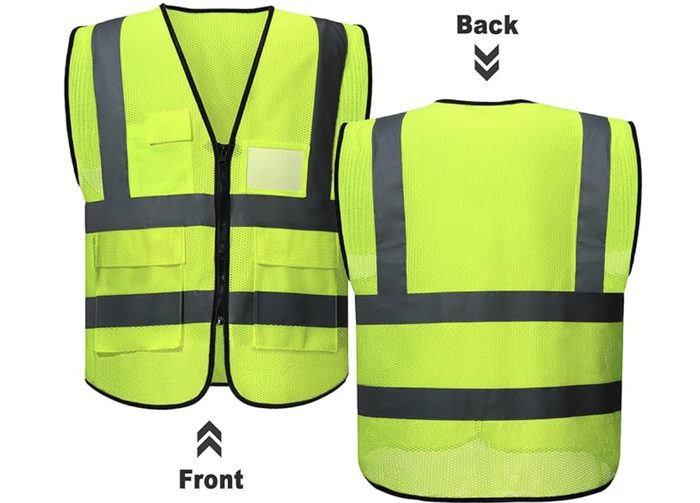 |
| Radio | Retevis IP67 | 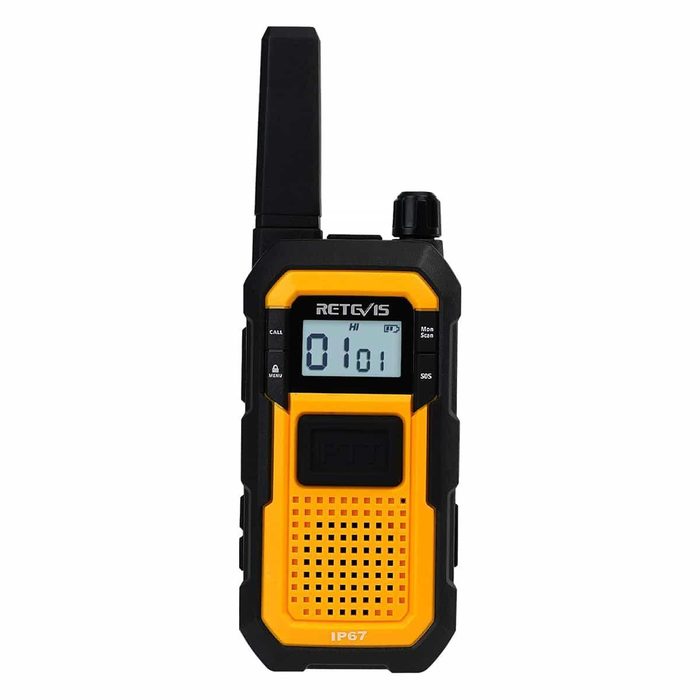 |
| Datalogic Scanner | Datalogic |  |
| LED Safety Baton | Uline — H-5190 | 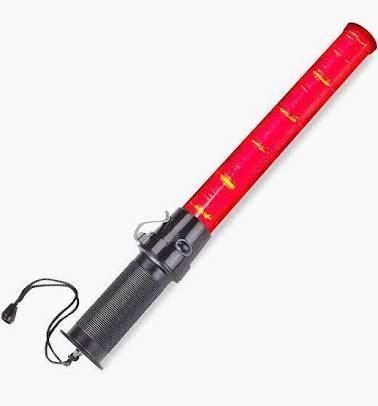 |
| Safety Whistle | Uline — S-26158BL |  |
Procedures
The following steps must be followed at all times unless otherwise directed by management.
Lot Attending
Returns Receiving
Sign-in to NellieScan — Parking Spaces
On the Datalogic scanner, sign in to the NellieScan app, click on "Operations", and then click on the "Parking Spaces" app.
Identify and Greet Customer
The Lot Attendant will identify a customer who has arrived for their appointment and will approach the car. Greet the guest quickly with a smile!
Lot Attendants are the face of Nellis Auction upon a guest's arrival. It is important that they greet guests with a smile and our standard greeting of "Welcome to Nellis Auction, Congrats on your wins!"
Select an Appropriate Parking Spot
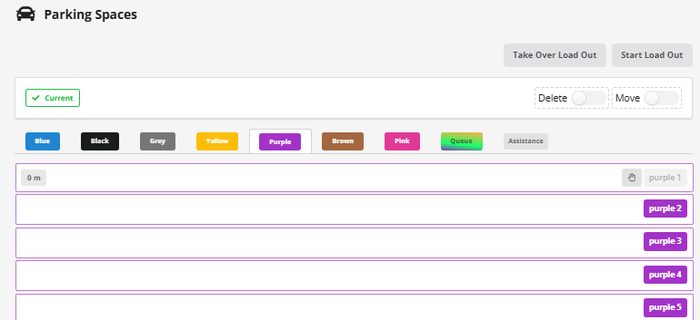
In the parking spaces app, navigate to the parking spot the customer has pulled into and click it. A hand will appear next to that spot. Click on the hand to open the spot.
Check Customer In
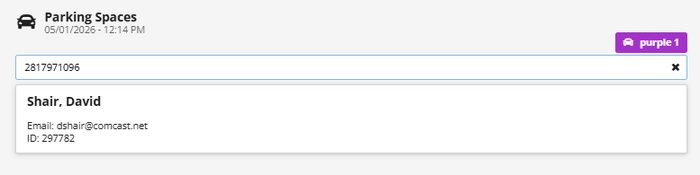
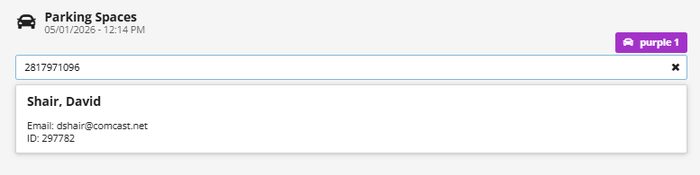
Greet customers with urgency and upon contact ask "May I please have your telephone number?" Type phone number into the field.
Complete Check-In
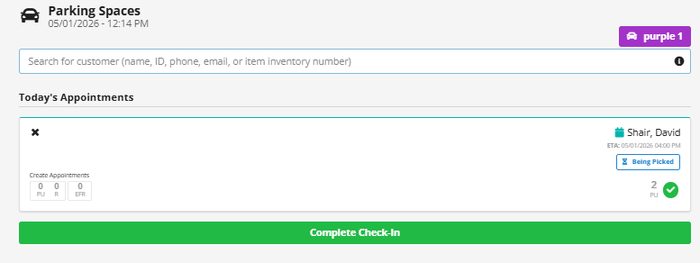
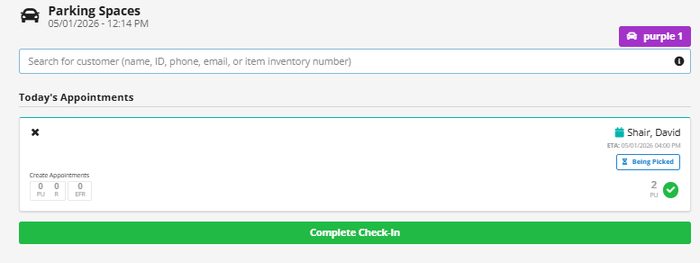
Verify with customers that their first and last names match what the lot attendant sees. Click complete check-in at the bottom to complete the check-in.
If the appointments have already been consolidated, let the customer know they will be brought right out.
If the order is still being picked, let the customer know about how long the expected wait time is (1 minute for every item to be picked).
Parking Space Assignment
- Assign each vehicle to the correct color-coded and numbered parking space.
- Ensure each vehicle is processed through its designated location.
System Processing
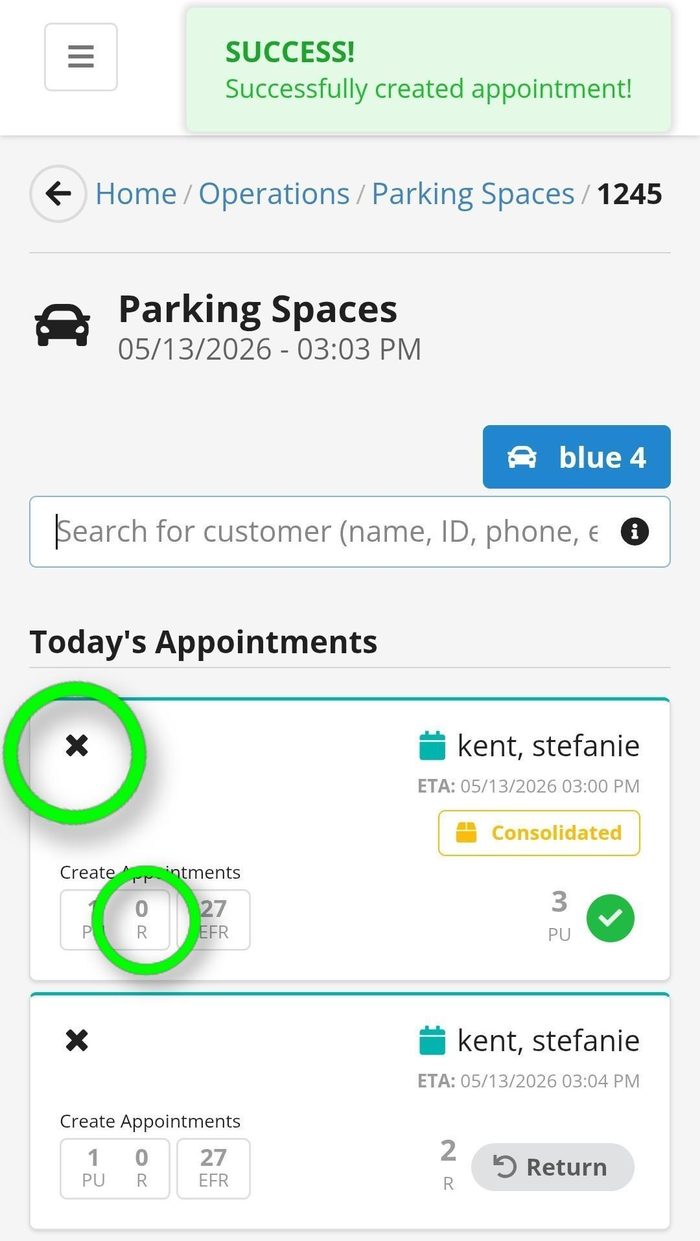
Do NOT check in the vehicle using the green appointment slot.
X out of the green appointment.
Select the "R" in the center square to properly separate the appointment.
This ensures accurate system processing and prevents errors.
Item Verification
Physical Item Verification Process
To ensure accurate receiving and prevent misreceiving, all returned items must be physically verified against the system before completing the return.
Process Steps
- As the customer hands over each item, scan the inventory number/barcode.
- Confirm the scanned item matches the item selected in the return system.
- Repeat this process for every returned item individually.
- Verify all labels, stickers, and identifiers match the correct inventory item before finalizing the return.
- If any mismatch is identified, stop the receiving process and escalate to leadership before proceeding.
Why This Matters
Customers can sometimes initiate returns for more items than they physically bring to the facility. Physical verification is essential to ensure:
- The correct items are received
- Inventory accuracy is maintained
- Over-receiving and misreceiving are prevented
- Fraud and shrink risks are minimized
Exception Handling
Examples of mismatches include:
- Barcode does not match the selected item
- Incorrect label or sticker attached
- Missing inventory tag
- Duplicate item scanned
- Customer initiated more items than physically present
If a mismatch occurs:
- Do not over-receive items under any circumstance
- Pause the transaction
- Notify a manager or designated lead
- Document the discrepancy per Common Exceptions guidelines

Complete Check In
- Confirm all scanned inventory numbers match the items selected in the return.
- Once all returned items have been physically verified and received, complete the customer check-in process in the system.
- Ensure the parking space is clear of merchandise, trash, carts, totes, and customer belongings.
- Return all equipment to its designated location.
- Update the system or queue status to show the parking space is available for the next customer.
- Notify the appropriate team member or call forward the next customer if required by site process.
Important: Never complete check-in or close a parking space if physical items do not match the system. All discrepancies must be resolved and escalated prior to completion.
Break Coverage
Team members may not take breaks simultaneously.
Maintain proper coverage in the parking lot at all times.
Parking Lot Setup
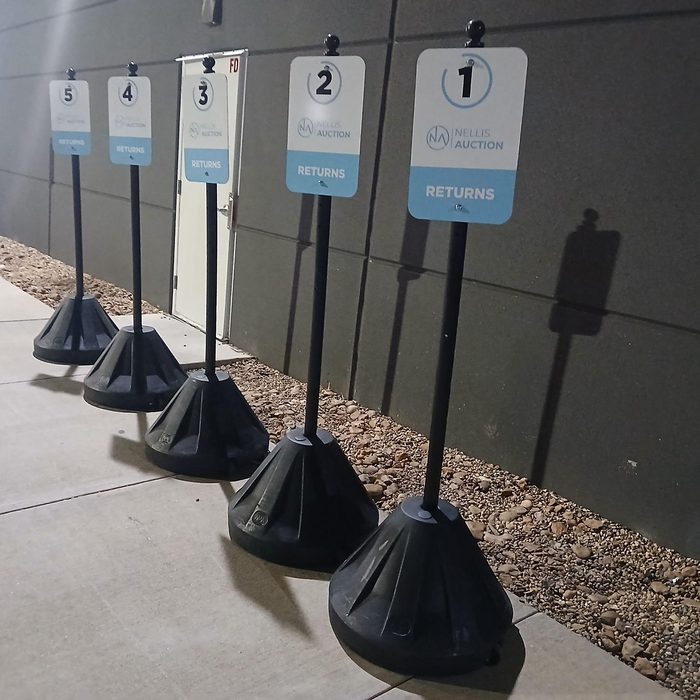
- Place designated parking spot signs outside daily prior to opening returns operations.
- Signs should be retrieved from the designated storage location assigned by site leadership.
- Ensure all signs are:
- Clean and professional in appearance
- Clearly visible to customers entering the lot
- Positioned in the correct numbered parking spaces
- Stable and secured properly before opening
- Inspect signs daily for damage, missing numbers, or visibility concerns and report issues to leadership immediately.
- At the end of operations, return all parking signs to their designated indoor storage area to prevent damage, theft, or weather exposure.
Standard: Parking lot signage should provide a clear, organized, and professional customer experience at all times.
High Volume Customer Handling
If a customer has a large number of returns and there is a queue of vehicles:
- Politely inform the customer of a short delay while additional resources are brought out to assist.
- Clear all currently occupied parking spaces first.
- Call for backup immediately, to aid in the higher inbound of customers.
- Once the line is cleared, assist the customer fully.
This ensures fairness, efficiency, and reduced wait times.
Process Flow Diagram
The following diagram provides a visual overview of the end-to-end process flow. Refer to the Procedures section for detailed step-by-step instructions.
Direct Customer to Assigned Parking Space
Verify Customer Appointment / Begin Check-In
Retrieve Return Information in System (if applicable)
Physically Receive Item From Customer
Scan Inventory Number / Barcode
Verify Physical Item Matches System Item
Repeat Verification Process for All Items
Any Mismatch or Quantity Discrepancy?
Complete Check-In in System
Confirm Parking Space Is Clear
Close Parking Space / Mark Available
Move Returns to Designated Staging Area (if applicable)
End Process
The Nellis Standard
The following standards are extracted from this SOP and represent the key observable, auditable behaviors and outcomes that define excellence in this process. These standards feed into the Nellis Auction master audit framework.
The Lot Attendant sets the tone for every visit. We welcome each guest, check them in quickly and efficiently, and ensure a smooth arrival—and when something's gone wrong with a return, we own it on behalf of Nellis, and represent the company by treating the customer with professionalism and respect.
Quantitative Metrics
PPH (Points Per Hour) — The number of points an individual employee earns in one hour for the collective direct actions they perform (e.g., checking customers in). Goal: >=100 PPH.
Gap Time — The amount of time, measured in minutes but typically reported as a % of total time, where an employee was not in an active state performing direct work. Goal: <=10% (example: 10% × 570 mins = ~57 mins).
Self Check-in % — Although an official metric has not been established, a general target for self check-in % is not to exceed 20-25% of total check-ins. Higher rates may indicate disengaged or understaffed lot attendants. Lower rates are generally acceptable, but depending on PPH and Gap time metrics, could indicate overstaffing.
Observational Metrics
Employee Active State – Employees are actively finding value-add work to do during slower periods, namely loading out, returning equipment that has been left outside in the customer lot, and cleaning when necessary. Employees are rarely observed congregating in an unproductive state.
Customer Queue – Although queuing is expected to happen periodically, it is also expected that the operation is staffed appropriately and reacts quickly to turn vehicles over efficiently and reduce wait times for customers via temporary upstaffing/ labor share, increasing safety/traffic coordinators and minimizing inefficient movements and activity.
Every arriving customer is approached immediately and greeted with a smile and the phrase "Welcome to Nellis Auction, congrats on your wins!"
Each vehicle is directed and assigned to a specific color-coded, numbered parking space; no vehicles are left unassigned, parked informally or ignored by a Lot Attendant.
Team Members work with urgency to check customers in and clear spaces promptly, keeping the queue moving and maximizing lot turnover without sacrificing accuracy or safety.
Returns customers are processed exclusively using the "R" separator in the system; the green appointment slot is never used for returns transactions.
Every returned item is physically verified against the system record before the return is finalized; no exceptions. If backup is necessary, backup must be requested. If a physical item does not match the initiated return appointment, the transaction is paused immediately and escalated to a Manager before any receiving is completed. Over or miss-receiving returns sets us up for friction with our customers later on.
During check-in, the Lot Attendant confirms the customer's first and last name against the appointment. Returns and pickup appointments are only received or released to a verified, authorized customer, never on assumption.
Customers are proactively told their order status—consolidated, still being picked, etc.—and given an honest estimate of approximate wait time. No customer is left without communication.
After every transaction, the parking space is physically cleared of all merchandise, trash, carts, totes, and customer belongings, AND the space is immediately marked available in the system; no spaces remain open or stale in the queue after a vehicle has departed or after a check-in is canceled.
At least one team member is present and active in the parking lot at all times; breaks are never taken simultaneously, leaving the lot unattended.
A friendly, professional demeanor is maintained through every interaction, even when customers are frustrated or non-compliant. Team Members de-escalate calmly and escalate to a Manager rather than entering into conflict.
Numbered parking signs (either permanent or daily/temporary) are visible and correctly positioned and maintained for a consistent look. Damages are reported locally same-day and addressed within 3-5 business days.
Each team member reports to the lot fully equipped: scanner, radio, safety vest, LED baton, and whistle confirmed present before operations begin.
Common Exceptions
Known exceptions to the standard process and their resolutions are documented below.
| Exception / Scenario | Resolution | Reference Document |
|---|---|---|
| Lot volume | Pause service, clear line, call for backup, then resume | N/A |
| Missing manager code | Contact Area Manager immediately | N/A |
Supporting Job Aids & Forms
Supplementary documents, job aids, checklists, and training materials are referenced below.
| Document Name | Description | Link / Location |
|---|---|---|
| Returns Checklist | Step-by-step quick reference | |
| Parking Layout Map | Assigned parking numbering | |
Training & Certification
Training requirements for this process are defined below. All roles must complete training before independently performing their duties.
| Training Requirement | Audience | Frequency | Delivered By |
|---|---|---|---|
| Initial Training | New Hires | Day 1 | Certified Trainer |
| Refresher Training | All Team Members | Quarterly | Area Manager |
Certification Requirements
Team members must receive sign-off from a Certified Trainer or Area Manager before independently performing any function covered by this SOP.
Quality Control & Auditing
This section defines how this process is monitored for quality and compliance.
Audit Schedule
| Audit Type | Frequency | Performed By | Documentation |
|---|---|---|---|
| Spot Check | Daily | Area Manager | Audit Report |
| Formal Audit | Monthly | Ops Manager | Audit Report |
Non-Conformance Handling
All deviations from this SOP will be addressed using a progressive accountability process to ensure compliance and continuous improvement.
Process Steps
- Journal Acknowledgement — Initial documentation of the issue. Team members acknowledge the expectation and correct process.
- Coaching 1 — First formal coaching conversation. Focus on reinforcing correct procedures and expectations.
- Coaching 2 — Second coaching session if behavior continues. Additional guidance and clarification provided.
- Corrective Action 1 — Formal corrective action issued. Documented performance concern with clear expectations for improvement.
- Corrective Action 2 — Escalated corrective action for repeated non-compliance.
- Corrective Action 3 — Final level of corrective action. May result in further disciplinary action up to and including termination.
Expectation: All team members are expected to follow SOP procedures at all times. Failure to comply will result in progression through the steps outlined above.
Safety & Compliance
Safety Requirements
Team members operating within the Returns parking lot are mandated to comply with all safety guidelines necessary for working in outdoor conditions, particularly by strictly adhering to the "Look, See, and Be Seen" protocol across all activities.
Weather Safety
- Maintain hydration levels continuously while on duty.
- Dress in a manner suitable for the existing environment, including extreme temperatures and sun.
- Apply sun protection regularly to avoid burning.
- Utilize ponchos or coats designed for rain when precipitation occurs.
- Use umbrellas as required to shield against sun or rain.
Visibility & Traffic Safety
- All employees must wear ANSI Class 2 or 3 safety vests.
- 360° Sweep: Perform a head-turn sweep before stepping into a driving lane.
- Never assume a driver sees you.
- Do not cross a vehicle's path until direct eye contact is made with the driver.
- Maintain awareness of moving vehicles at all times.
- Ensure clear communication with drivers when directing traffic.
Lifting & Physical Safety
- Use proper lifting techniques by maintaining a wide base, hinging at the hips, and squatting down while keeping the load close to the body.
- Mandatory use of a Team Lift or Mechanical Aid (e.g., dolly/panel cart) for any heavy or awkward load.
- Prior to lifting, conduct a 5-Second Size-Up to test the load and ensure the path is clear of all trip hazards.
- During movement, avoid twisting the torso — instead, lead with the hips and keep the load within the Power Zone (mid-thigh to mid-chest).
Heat Illness Prevention
Working outdoors in high temperatures presents a risk of heat-related illness. All team members must follow these guidelines to prevent heat stress, heat exhaustion, and heat stroke.
Hydration:
- Drink water frequently throughout the shift (do not wait until you feel thirsty).
- Recommended: at least 8 oz of water every 15–20 minutes in extreme heat.
- Avoid excessive caffeine or energy drinks, as they can contribute to dehydration.
Rest & Breaks:
- Take cool-down breaks in shaded or indoor areas as needed.
- Follow all scheduled breaks and communicate with a manager if additional recovery time is needed.
- Rotate tasks when possible to limit prolonged sun exposure.
Clothing & Protection:
- Wear lightweight, breathable clothing.
- Use hats, sunglasses, and sunscreen to reduce sun exposure.
- Utilize shaded areas whenever available.
Signs & Symptoms Awareness
Heat Stroke (Medical Emergency — Call 911):
- High body temperature
- Flushed, red, hot, dry skin
- Fainting or loss of consciousness
- Confusion, agitation, slurred speech, delirium
- Seizures and coma
- Nausea and vomiting
- Rapid breathing
- Racing heart rate
- Headache
Heat Exhaustion:
- Cool, moist skin with goose bumps when in the heat
- Heavy sweating
- Faintness, dizziness, or headache
- Fatigue
- Weak, rapid pulse
- Low blood pressure upon standing
- Muscle cramps
- Nausea
Response
If heat stroke is suspected:
- Call 911 immediately if: loss of consciousness, fever >102°F (38.9°C), change in alertness (confusion, seizures, vomiting), other heatstroke symptoms, or condition worsens despite treatment.
- Move to a shaded/cool area. Fan air; apply wet cloths, ice packs, or wet towels to head, neck, trunk, armpits, and groin.
- Provide water immediately (if conscious and not vomiting).
- Stay with the employee until help arrives. Remove outer layers of clothing.
If a team member shows signs of heat exhaustion:
- Have the person sit/lie down in a cool, shady area (preferably the Cool Down Zone).
- Notify a manager and contact Nurse Triage Line (855) 302-1886.
- Give plenty of water or cool beverages (no alcohol or caffeine).
- Cool person with cold compresses/ice packs.
- If symptoms do not improve within 60 minutes, coordinate transport to a clinic or emergency room.
Expectation: All team members are responsible for monitoring their own condition and looking out for others. Early reporting of symptoms is critical to preventing serious health issues.
Incident Reporting
All safety incidents, near-misses, and hazardous conditions must be reported immediately to ensure a safe work environment and proper documentation.
What to Report
- Work-related injuries and illnesses
- Near-misses (events that could have caused injury or damage)
- Unsafe conditions (equipment issues, hazards, weather-related risks)
- Vehicle-related incidents in the parking lot
Reporting Process
- Notify a Manager Immediately — Report the incident to the Area Manager or supervisor as soon as it occurs. Do not delay reporting, even for minor incidents.
- Ensure Safety First — Stop work if necessary. Move to a safe location. Assist any injured individual if it is safe to do so.
- Seek Medical Attention (if needed) — For injuries, request first aid or medical assistance by contacting the Nurse Hotline. Call 911 for serious situations.
- Document the Incident — Complete the Safety Hub report form (https://forms.gle/mBVRDh1xuEmEshSEA) with accurate details, including time, location, individuals involved, and a detailed description.
- Manager Documentation & Escalation — The Manager will log the incident per company policy. For injuries/illnesses: complete Slack notification. If the incident results in a medical visit, complete the Injury and Illness Incident Report (IIIR). Escalate to upper management, EHS, or HR if required.
- Follow-Up — Follow all corrective actions or safety recommendations provided. Utilize the Incident Investigation Form to conduct a thorough investigation if requested.
Expectation: Non-compliance with incident or hazard reporting protocols may lead to formal disciplinary measures. Timely notification is essential to mitigate operational risks and maintain a secure environment for all personnel.