
Standard Operating Procedure
Returns
Returns · All Nellis Auction Locations
| Document ID | SOP_Operations_Returns_5/27/2026_V1 |
| Version | 1.0 |
| Effective Date | 5/27/2026 |
| Process Owner | Inventory Processing Area Manager |
| Department | Returns |
| Facility | All Nellis Auction Locations |
Purpose
A return SOP ensures every return is handled accurately and consistently, refunds are issued in a timely manner, and each item is properly evaluated to determine whether it can be resold, reprocessed, or must be discarded—helping maintain customer trust while recovering as much value as possible.
Scope & Audience
Scope
This SOP covers the evaluation and processing of returned items across all size categories—small, medium, large, and extra large—and outlines how to accurately inspect each item, determine its disposition (resell, reprocess, or discard), and ensure refunds are issued back to the original form of payment in a timely and consistent manner.
Audience
Ops Managers oversee compliance with the SOP and overall performance; Area Managers manage day-to-day return processes and resolve issues; Returns Clerks handle receiving, inspecting, and processing items and refunds; and Lot Attendants assist with moving, staging, and organizing returned items for evaluation and processing.
Roles & Responsibilities
| Role | Responsibility | Description |
|---|---|---|
| Ops Manager | Overseeing | Ops Managers oversee compliance with the SOP and overall performance |
| Area Manager | Manage | Area Managers manage day-to-day return processes and resolve issues |
| Certified Trainer | Training | Provides ongoing training to ensure SOP compliance. |
| Lot Attendant | Receiving Returns | Receives customers returns at check in, validates return eligibility, the reasonings of the return and initiates the return process. |
| Returns Clerk | Processing Returns | Reviews returns reason, inspects item, verifies against original listing and determines the status of terms below. |
Definitions & Key Terms
| Term | Definition |
|---|---|
| Return | This item was previously purchased through Nellis Auction and is being returned because it did not meet the customer’s expectations or is no longer wanted. |
| Misdescribed item | This item is being returned due to discrepancies with its description—such as undisclosed damage, incorrect size, color, or dimensions, missing parts, lack of functionality, or condition not matching “new” as stated |
| Reprocessed item | This item, with or without updates to the original listing, is suitable for resale. |
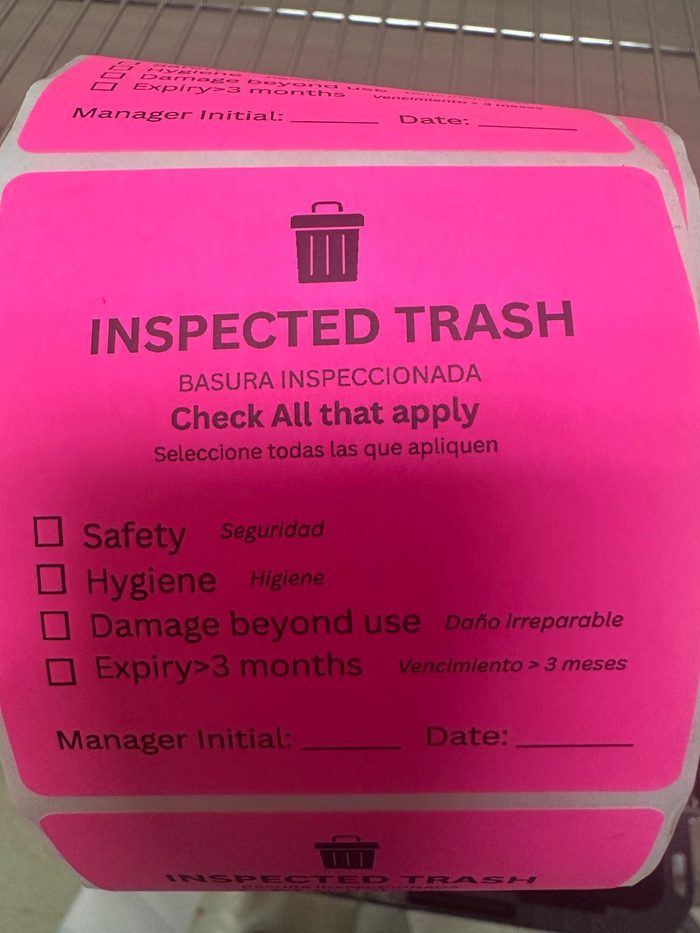
| Trash item | A trash item is a returned product that is damaged, incomplete, or unsellable and cannot be resold or reprocessed, requiring disposal. Must be approved by an Operations manager or Area Manager and labeled with a trash sticker. |
| Inventory Number | An Inventory number is a unique sticker code assigned to a unique item that is used to track and look up an item’s history throughout the return and processing system. |
| Customer Notes | Document any customer interaction, request, or behavior that falls outside the standard process, established policy, or normal transaction flow. This section serves as an internal record to help maintain consistency, provide context for future interactions, and support accountability across teams. All notes should be factual, professional, and concise. Avoid personal opinions or unnecessary details. The purpose of this section is to maintain a clear historical record for operational reference and continuity of customer service. |
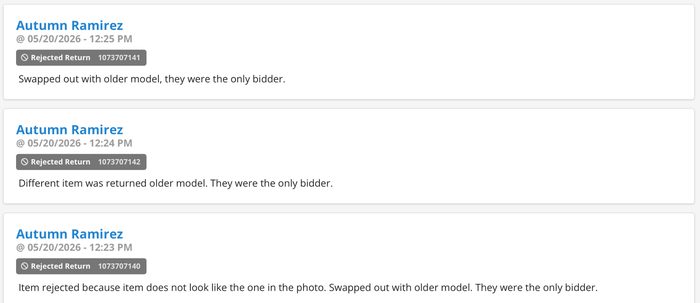
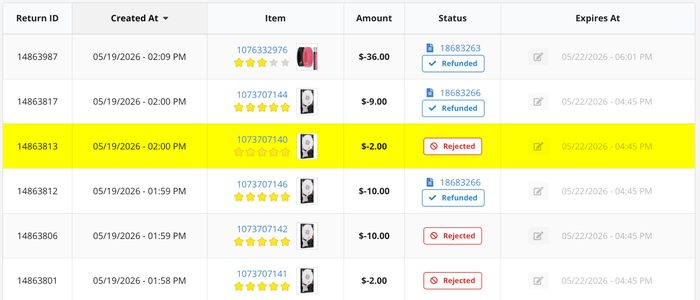
| Rejected item | A rejected item is a return that cannot be accepted because it is outside the 7-day return policy or is missing required components or parts. When an item is rejected customer notes are required with reasoning. |
| Awaiting Processing Queue | An Awaiting Processing Queue is a page used in the returns workflow that lists all return items that have been started or submitted but have not yet been processed by a returns clerk. The queue helps clerks identify which returns are waiting to be processed next. Once a clerk begins working on a return, the item is typically removed from the awaiting queue or moved to another status such as “In Progress” or “Completed.” |
| Awaiting Refund Tab | An Awaiting Refund tab is the section of the returns process where fully inspected and processed return items wait for the final refund step to be completed. This tab is used after a returns clerk has. Reviewed the returned item, Confirmed the return is approved, andFinished processing the return details. From the Awaiting Refund tab, the clerk completes the return by issuing the customer’s refund through their selected refund method, such as. Returning funds to the original payment card, Issuing store credit, and Applying another approved refund option. This is typically the final step in the returns workflow before the return is marked as completed. |
| Store Credit | Store credit is a refund option issued to a customer in place of returning funds to the original payment method. The credit can be used toward future purchases within the store or company system. Store credit is typically applied as a digital balance account credit and may be issued based on return eligibility, company policy, or customer preference. Store credit may also be issued as an inconvenience credit when an order issue occurs, such as a missing item, damaged item, or item that was misdescribed. |
| Same Day Refund | Same Day Refund refers to when a customer requests a refund for an item on the same day it was purchased. Refunds for same-day returns require a 24-hour processing period before they can be officially completed. |
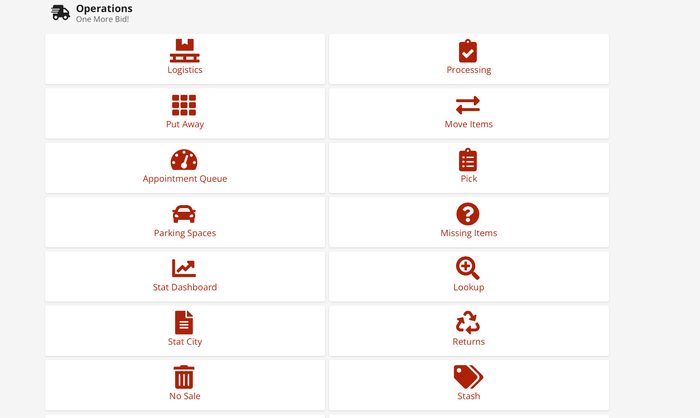
| Returns Module | To access the Returns Module, begin on the Cargo home page and select the Operations tab. From the list of available options, click the Returns tab identified by the recycle symbol. This will open the Returns Module. |
| Original Form Of Payment | Original Form of Payment refers to the payment method originally used by the customer to purchase won items online, whether by personal card or store credit, depending on the payment method used. |
| Serial Number | A Serial Number is a unique code assigned to each high-value item to verify and identify the specific item described. |
Required Supplies & PPE
| Equipment / Supply | Supplier / Item Number | Photo / Reference |
|---|---|---|
| Laptop | Ordered by Executive Admin |  |
| Poly Bags | Uline- S-1004, S-1440 |  |
| Hand Scanner | https://www.amazon.com/WoneNice-Barcode-Scanner-Handhel | 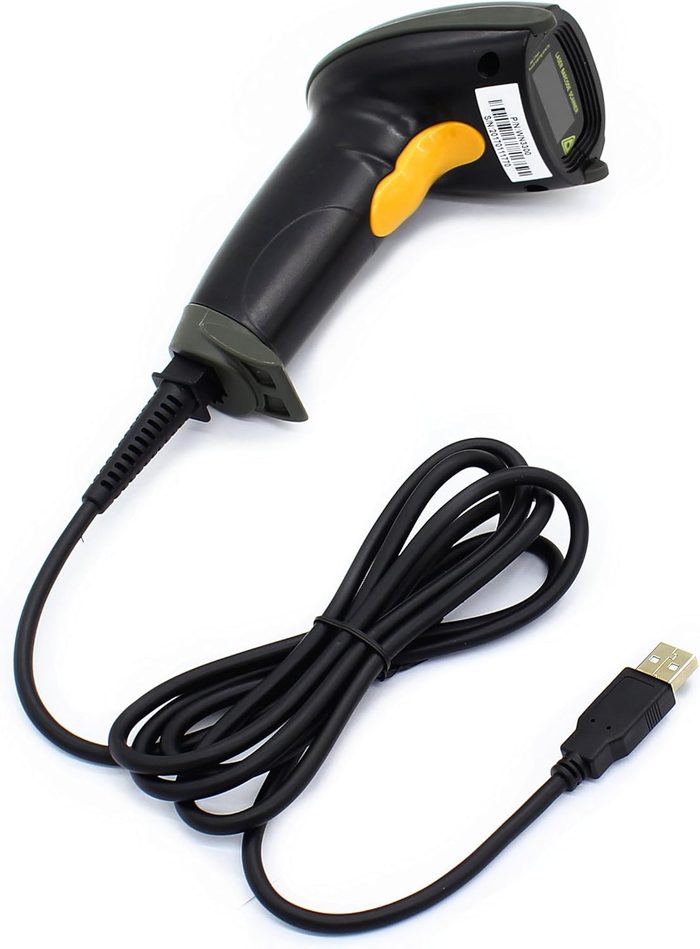 |
| Inventory Labels | Ordered by Executive Admin | 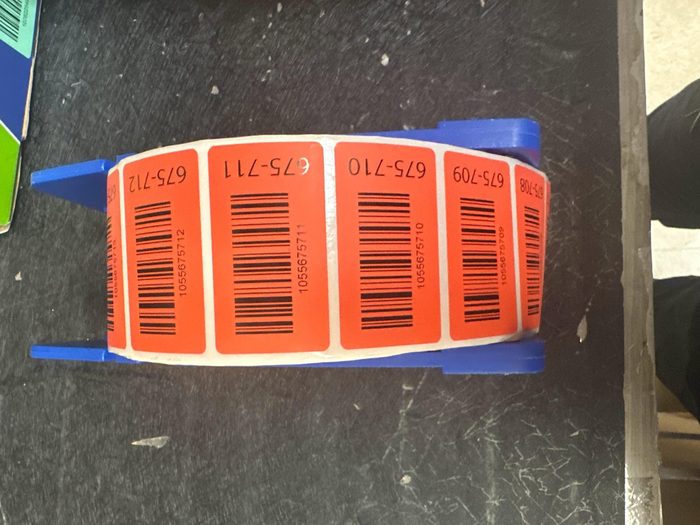 |
| SpeedPacks | Ordered by Executive Admin |  |
| Tape | Ordered by Executive Admin | 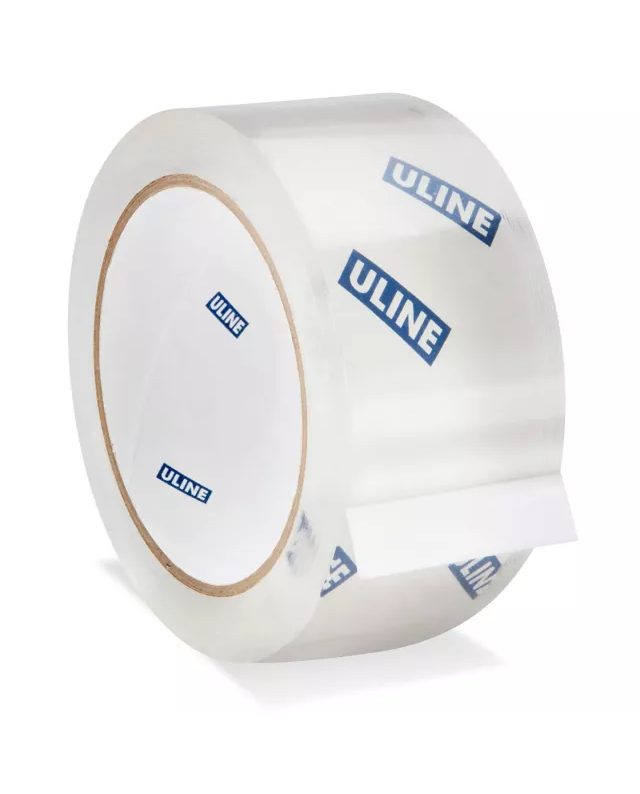 |
| Box cutter | Uline/ H-1369 | 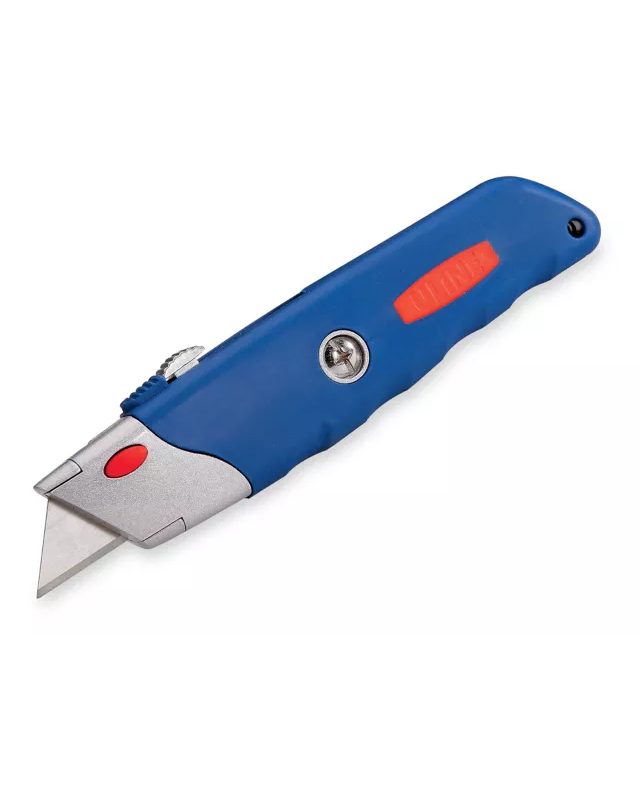 |
| Gloves | Uline/ S-16882R |  |
| iPhone | https://www.amazon.com/Apple-iPhone-15-128GB-Black |  |
| Tape Dispenser | Uline- H-596 | 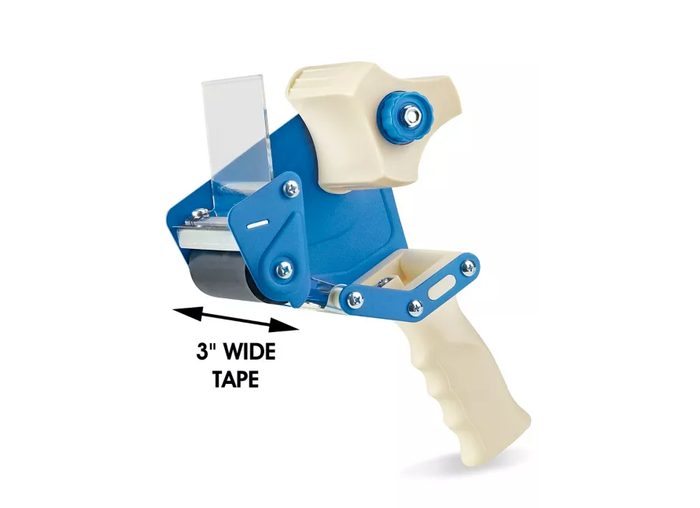 |
Procedures
Outline the precise procedural steps. These must be followed at all times unless otherwise directed by management.
Log into Cargo System
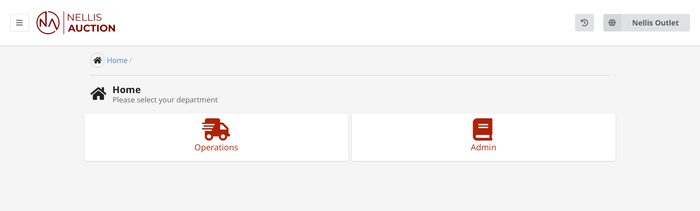
Returns Clerk logs into Cargo and selects the “Returns” module in Operations Tab
Verify
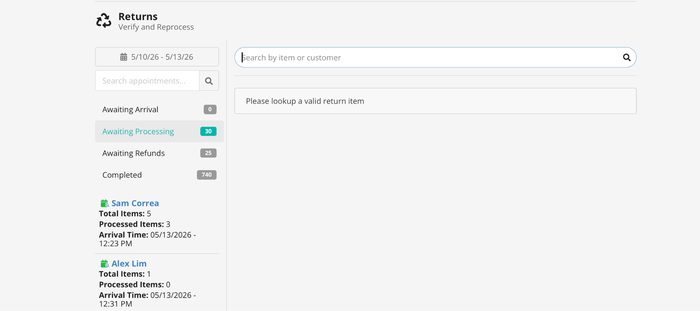
Click the awaiting processing queue and scan inventory number into the search by item or customer search bar in the top middle of the screen. Once the item is selected and verified.
Inspection Of Item
The Returns Clerk performs a detailed inspection based on the customer’s stated return reason. The inspection includes:
- Verifying the item matches the original posting (description, photos, and specifications)
- Inspecting the item for any damage, wear, or defects
- Confirming the quantity and included components match the original listing
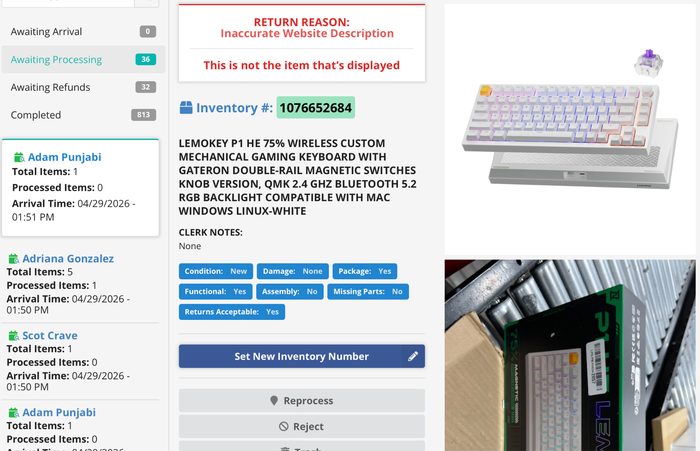
Determine Disposition
Based on the inspection results, the Returns Clerk must assign the appropriate disposition to the item. Each determination should be supported by inspection findings and documented in the system.
- Reprocess → The item is eligible for resale.
- Item matches the original listing, or discrepancies are minor and can be corrected
- Item is functional and in sellable condition
- Any missing or incorrect details can be updated in the listing prior to resale
- Make sure the item is repackaged if needed
- Item has been inspected and verified to be fully functional, free from defects that would impair normal use, and in condition suitable for resale within the assigned condition grade. The item must meet operational, cosmetic, and quality standards required for customer sale and must not present any safety, reliability, or usability concerns.
- Reject → The item is not eligible for return or resale under the original transaction.
- Item does not match the original LOT (e.g., wrong item, serial number mismatch)
- Evidence of customer misuse, excessive damage, or tampering
- Return violates return policy or eligibility criteria
- Check customer history of notes so all locations are aware
- Trash → The item is not suitable for resale.
- Item is severely damaged, non-functional, or unsafe
- Repair or reprocessing is not cost-effective meaning no parts, nothing attached to this item can be used
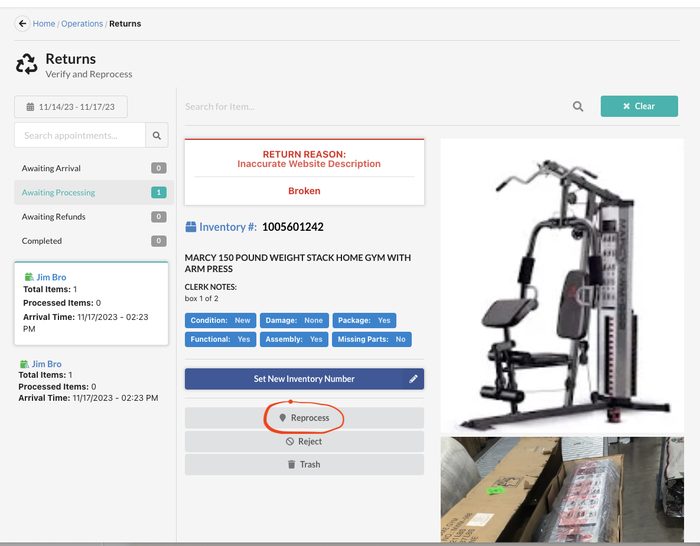
Refund
Select the awaiting refund tab to complete the return purchase transaction, and then press apply refund. Depending on the customer's preference, return to the original payment or store credit. If the item exceeds the 7 day return policy, it must go to store credit, unless the manager approves it to go back to the original payment. If the purchase was made the same day, the refund cannot be processed until the following business day. The clerk should leave the transaction in the ‘Awaiting Refund’ tab and notify the manager or designated follow-up staff. The transaction should remain flagged/pending in the system until the refund is completed the next day.
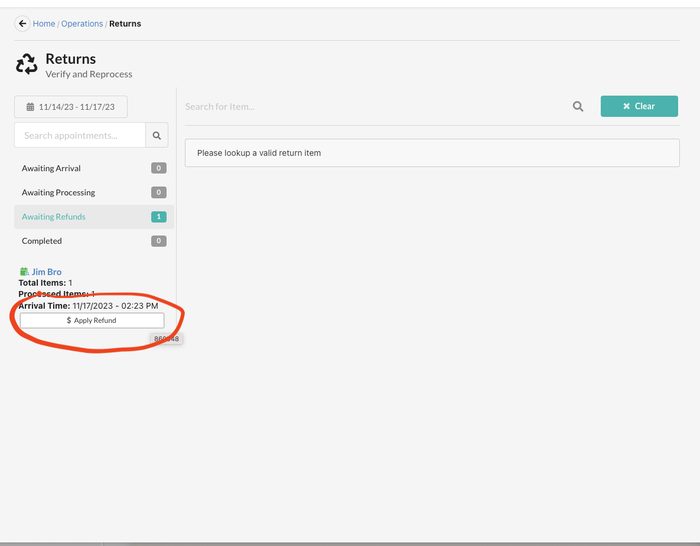
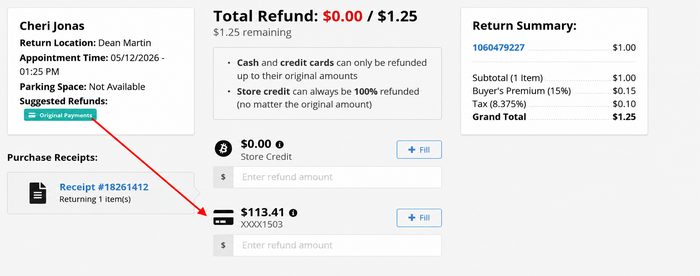
Final Steps
Reprocessed Item
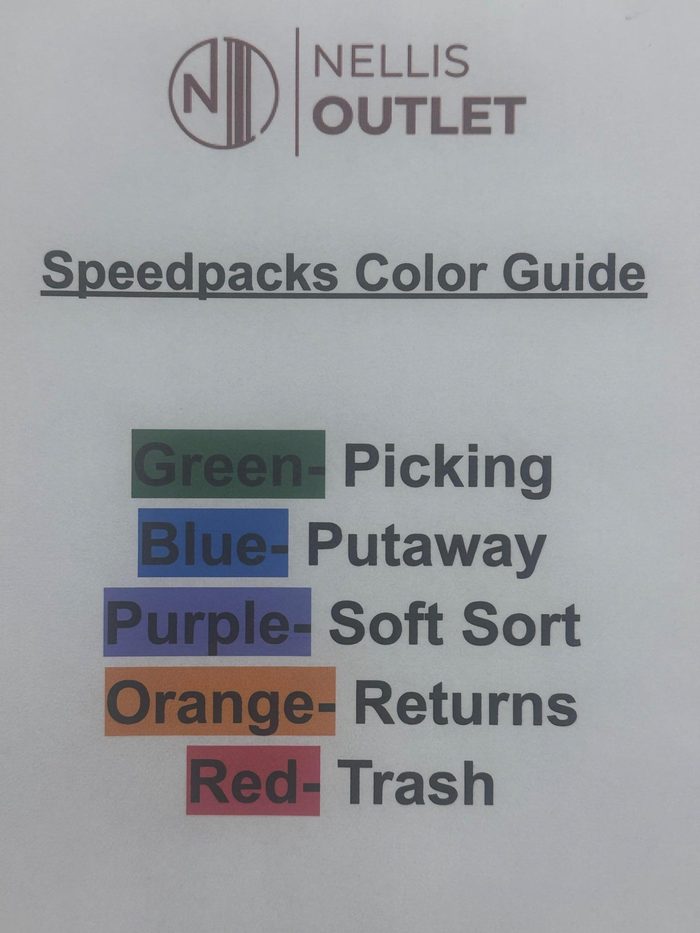
After an item is reprocessed, it is placed into a designated put-away speed pack and staged in the put-away area to be put away by a staff member.
Trash Item Procedure
If an item is marked for trash in Returns, it must be inspected by a Manager on Duty to confirm the item should be discarded rather than reprocessed. The Manager applies a trash sticker to the item and signs off with the reason for disposal. Once approved, the item is placed into a designated trash speed pack to be discarded by a staff member.
Rejected Item
A rejected item is a returned item that, upon inspection by the Returns Clerk, is found to be incorrect, incomplete, damaged beyond acceptable return condition, or not in the same condition as when it was originally released to the customer.
The Returns Clerk verifies the item and escalates the issue to a Manager if the item appears to be incorrect or missing components. If the Manager confirms the issue, the return is rejected and a note is added to the customer’s account documenting the reason for rejection.
The customer is then contacted by phone and informed of the decision. The customer may:
- Return the missing or incorrect components to continue the refund process, or
- Pick up the item in its current condition
If the customer does not respond or choose either option, the item will be held for up to seven (7) days. After the holding period expires, an Operations Manager or Area Manager will make the decision on whether to trash the item or reprocess the item.
Process Flow Diagram
The following diagram provides a visual overview of the end-to-end process flow. Refer to the Procedures section for detailed step-by-step instructions.
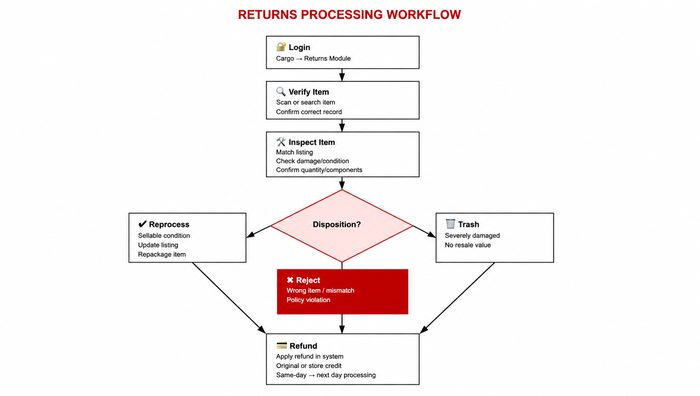
The Nellis Standard
A return is a signal that something likely went wrong—and it's our chance to make it right and earn back the customer's trust. We inspect returns accurately, refund fairly and quickly, and recover as much value as we can.
Quantitative Metrics
Productivity / UPH - Although returns processing is not currently treated as a direct assignment and therefore an official rate of productivity is not established, we seek to achieve a returns UPH of approximately X units/hour per Returns Clerk.
Gap Time – The amount of time, measured in minutes, but typically reported as a % of total time where an employee was not in an active state performing direct work. Although there are acceptable levels of gap time expected for all employees, the goal is generally to minimize this as much as possible. Goal: <= 10% (example: 10% x 570 mins = ~ 57 mins). Because Returns Clerks are currently classified as Indirect, gap time should remain characteristically low based on how indirect assignments are managed in Labor IQ..
Observational Metrics
FIFO Management - Unprocessed returns should be neatly and intuitively organized by the day they were received with clear labels. The Returns queue should not exceed 48 hour-old returns.
Every return is thoroughly evaluated, processed according to the return reason code, and updated with increased transparency to minimize future recurring returns on the same item. Only items that meet our strict internal trash eligibility criteria should be trashed in accordance with our business philosophy that every item has a bidder.
Returns are received and processed so that refunds can be issued within 48 hours of drop-off and clear FIFO labeling and grouping exists to maintain order amongst open returns.
Return Queue SLA (inspection/disposition start): Return must be reviewed and actioned within 24 hours of entering Awaiting Processing.
Refund SLA: Once approved for refund, the refund is completed within 24 hours.
Exceptions: Fraud review, missing components, hazardous/damaged goods, or carrier investigations may pause the standard with documentation.
Returned inventory is staged in clearly labeled containers and staged in designated 5S storage locations, where it cannot be easily misinterpreted as putaway or unprocessed inventory.
Returned inventory that is recommended for trash is first reviewed by the Area Manager before physically transported to the waste receptacle.
Every return carries factual, professional, and concise notes. Rejections, exceptions, high-value reviews, and management approvals are documented as they occur, creating a clear historical record for future interactions and audits.
Returns Clerks check for fraud indicators—mismatched inventory stickers, duplicate or old receipts, swapped or used merchandise, and serial numbers that don't match the record—and escalate suspected fraud to the Area Manager before dispositioning. High-value items receive serial verification, accessory checks, and condition photos prior to refund approval.
Returns Clerks use proper lifting techniques, approved cutting tools, and required PPE when handling damaged, sharp, or contaminated items, and keep work areas clear. Incidents and near-misses are reported immediately and logged in The Safety Hub. (Consistent with the PPE standard in the Safety Coordinating SOP.)
Common Exceptions
| Exception / Scenario | Resolution | Reference Document |
|---|---|---|
| Suspected Fraud | Escalate to Area Manager | Customer returns a lower-cost item with a higher-priced tag attached. Customers use an old or duplicated receipt to return merchandise already refunded. Customer returns a product box containing: A different item Missing components Used merchandise instead of new Electronic item serial number does not match sales receipt or system record. |
| Store Credit or Original Payment | Escalate to Operations Manager | Verify original payment method. Confirm return eligibility. Review customer history and previous notes. Determine whether store credit is allowed. Escalate to Operations Manager if: Outside policy Large refund amount Payment verification issue Document approval details. Process approved refund method. |
| High Value Items | Require Manager Review | Inspect items thoroughly. Verify SKU and serial number. Confirm all accessories are included. Review receipt and transaction history. Require Manager Review before refund approval. Take photos of condition and packaging. Complete documentation before processing the refund. |
| Customer History | Overview of notes and customer percentage | Open customer profile/history. Review previous notes and exceptions. Compare return activity against purchases. Identify repeat behaviors or trends. Add detailed notes to the current return. Escalate concerning patterns to management. |
| Missing/Damaged | Manager approval for store credit to keep the item. | Inspect items carefully. Determine whether damage is: Customer caused Manufacturer defect Shipping damage Verify all components. Photograph all damage. Manager approval required for: Store credit while customer keeps item Partial refunds Policy exceptions Document all findings in system notes. Process approved resolution. |
| Awaiting processing | At the end of each shift take the dates from start of your week to till the end and double check all returns have been received and moved to finish to complete returns that may have been stuck or old from previous dates | Open returns processing queue. Review all returns from: Start of current week Current date Verify each return has been: Received Inspected Moved to final status Identify: Stuck returns Aging returns Missing approvals Resolve incomplete transactions. Escalate unresolved issues to management. Ensure no older returns remain open. |
Supporting Job Aids & Forms
| Document Name | Description | Link / Location |
|---|---|---|
| [Lot attendant SOP] | [Brief description of lot attendant SOP to ensure communication between clerk and lot] | [link when available] |
Training & Certification
| Training Requirement | Audience | Frequency | Delivered By |
|---|---|---|---|
| Initial Onboarding Training | New Hires | Day 1 | Certified Trainer |
| Recertification / Refresher | All Team Members | Quarterly | Area Manager |
Certification Requirements
Certification / Sign-Off Requirement
Before independently processing returns, a Returns Clerk must complete a structured onboarding and approval process:
- Training Completion: Must complete SOP training covering verification, inspection, disposition rules, and refund policies.
- Shadow Period: Must successfully shadow a senior clerk for a defined number of returns (or shifts) with no critical errors.
- Practical Assessment: Must demonstrate correct end-to-end processing (verification → inspection → disposition → refund) under supervision.
- Policy Knowledge Check: Must pass a short compliance check on key rules (e.g., 7-day refund policy, rejection criteria, approval requirements).
- Final Sign-Off: Supervisor or manager provides formal approval once accuracy and consistency standards are met.
Once signed off, the clerk is authorized to process returns independently but remains subject to ongoing audits and performance review.
Quality Control & Auditing
Quality & Compliance Monitoring
Returns are monitored through daily sample checks and weekly audits to ensure accurate dispositions, proper inspections, and policy-compliant refunds. Key metrics such as accuracy, processing time, and error rates are tracked, while exceptions (e.g., overrides, high-value returns) are reviewed. System controls enforce required fields and approval rules, and ongoing feedback and training ensure continuous improvement and accountability.
Audit Schedule
| Audit Type | Frequency | Performed By | Documentation |
|---|---|---|---|
| Spot Check | Daily | Area Manager | Audit Log / Form |
| Formal Audit | Weekly | Ops Manager | Audit Report Template |
Non-Conformance Handling
Non-Conformance Handling
Any deviation from the SOP is identified through daily checks, audits, or system flags and documented with details of the error. Minor issues are addressed immediately through coaching and correction, while repeated or significant violations are escalated to a supervisor or manager. The team member may be required to complete retraining and demonstrate correct processing under supervision before resuming independent work. High-risk or policy-related violations (e.g., incorrect refunds, misuse of approvals) may result in restricted system access or further disciplinary action. All incidents are tracked to identify trends and prevent recurrence.
Safety & Compliance
Safety Requirements
Safety & PPE
Returns processing involves risks such as cuts from damaged items, strain from lifting, exposure to contaminated goods, and electrical hazards. Team members should use proper lifting techniques, keep work areas clear, and wear PPE as needed (e.g., gloves for sharp or contaminated items). Damaged electronics should not be tested, and hazardous or bio-contaminated items must be isolated and escalated. Follow OSHA-aligned practices by reporting unsafe conditions, using required PPE, and disposing of items according to safety guidelines.
Incident Reporting
Incident & Compliance Reporting
All safety incidents, near-misses, or compliance violations must be reported immediately to a Supervisor or Manager. The team member must document the event using The Safety Hub report form (including date, time, item, and description of what occurred). Any injuries or hazardous conditions should also be escalated to Safety/HR per company policy. If required, the item involved should be isolated and clearly labeled. Management will review the report, determine corrective actions, and document resolution to ensure compliance and prevent recurrence.